
Create a cluster
Open Clusters and click New Cluster.
Who can create one
- You must be an Admin of the team the cluster will belong to. The Team list shows only those teams.
- The credential must be one you added. Credentials are personal and are not shared through teams.
- The team owner's billing plan must have room for another cluster. The cluster is billed to the team owner.
The form
| Field | What to enter |
|---|---|
| Cluster name | Any name that helps you recognise it, for example production-eu. |
| Team | The team that will own the cluster. Its members get access according to their role. |
| Credential | The cloud account to create the cluster in. The provider badge next to the label shows which cloud it is. |
| Region | Where the cluster runs. The list is filled in after you pick a credential. |
| Availability zones (optional, AWS) | The zones to spread the cluster over, as a JSON list of full zone names, for example ["ap-south-1a","ap-south-1b"]. Each must belong to the chosen region. Leave it empty to let AWS choose. |
| VPC CIDR (optional) | The address range for the cluster's new VPC, for example 10.0.0.0/16. The block size must be between /16 and /28. Set it if the cluster must not overlap a network you will peer with. |
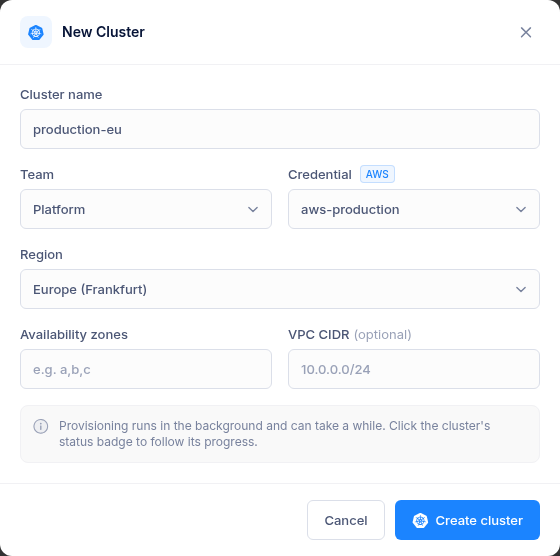
Click Create cluster. The credential is checked with the provider before anything is created.
What gets built
- A managed Kubernetes cluster on the current Kubernetes version (EKS on AWS).
- A first node group, sized for the platform services. On AWS:
m6i.xlargeinstances with a 100 GiB disk, autoscaling from 1 to 20 nodes. You can add or resize node groups later. - An ingress load balancer with a wildcard domain for the cluster. Applications get addresses such as
myapp.c-42.k8s.kstych.com, where42is the cluster ID. - The platform services:
| Service | Address | Used for |
|---|---|---|
| CI/CD (Devtron) | cicd.c-<id>.k8s.kstych.com |
Build and deploy pipelines |
| GitLab | git.c-<id>.k8s.kstych.com |
Private Git repositories |
| Docker Registry | registry.c-<id>.k8s.kstych.com |
Private container images |
| Grafana | grafana.c-<id>.k8s.kstych.com |
Metrics and dashboards |
Certificates for these addresses are issued and renewed automatically.
How long it takes
About 40 minutes. The cluster shows Creating until everything is installed, then Running. Click the Creating badge to watch the provisioning log. The team members get a "Cluster Setup is Complete" email once it is ready. If provisioning fails, the cluster shows Error and you get an email. See Troubleshooting and support.
Only one change runs on a cluster at a time. While a cluster or node group in your teams is being created or changed, another create is refused with "A cluster is Already being modified in your Teams". Wait for it to finish and try again.
Cost
The cluster's resources (control plane, nodes, disks, NAT gateway, load balancer) run in your cloud account and are billed to you by your cloud provider. Separately, the platform bills each cluster at your plan's monthly rate, pro rata by the minute it exists. See Billing and credits.