
Node groups
A node group is a set of identical machines (nodes) that your workloads run on. The cluster autoscaler adds nodes when pods cannot be scheduled and removes them when they sit idle, always within the group's minimum and maximum.
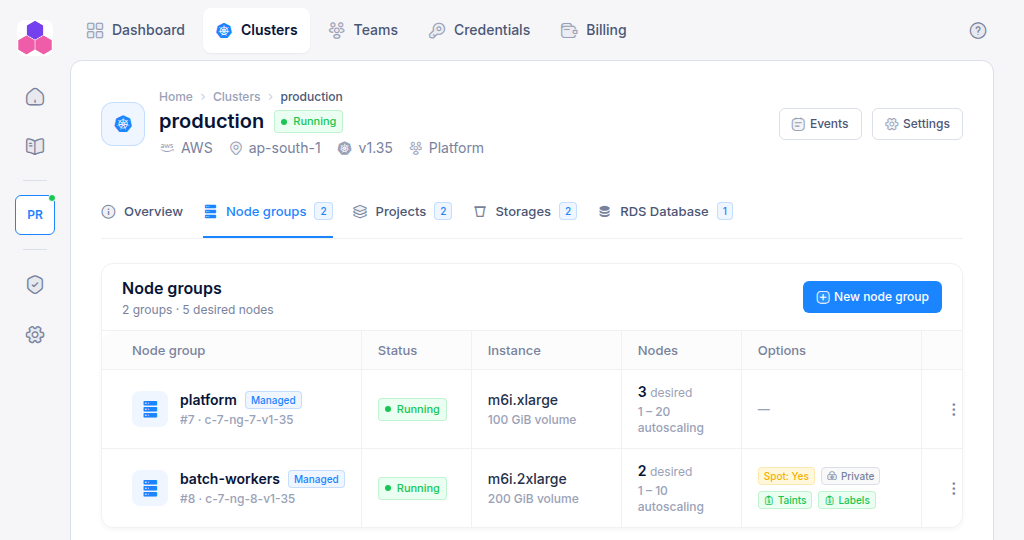
Open a cluster and select the Node groups tab. The table lists each group's status, instance type and disk, its node count and autoscaling range, and its options (spot, private networking, taints, labels).
Add a node group
Click New node group. Team Admins only.
| Field | What to enter |
|---|---|
| Instance type | The machine size. Each option shows its vCPUs and memory, for example m6i.xlarge · 4 vCPU · 16 GiB. |
| Nodes: minimum / desired / maximum | The autoscaling range and the starting size. Minimum 0–1000, maximum 1–1000, and desired must lie between them. |
| Volume size (GiB) | Disk per node, 50–2000 GiB. |
| Spot instances | Yes uses spare capacity at a lower price. The cloud provider can reclaim these nodes at short notice, so use spot only for workloads that tolerate restarts. |
| Private networking | Yes gives the nodes no public IP addresses. |
Under Advanced, all fields are optional and written as JSON:
| Field | Example | Use |
|---|---|---|
| Taints | [{"key":"dedicated","value":"gpu","effect":"NoSchedule"}] |
Keep pods off these nodes unless they tolerate the taint. |
| Labels | {"role":"worker"} |
Let pods select these nodes with a nodeSelector or affinity. |
| Availability zones | ["us-east-1a","us-east-1b"] |
Limit the group to some of the cluster's zones. Leave empty to use all of them. |
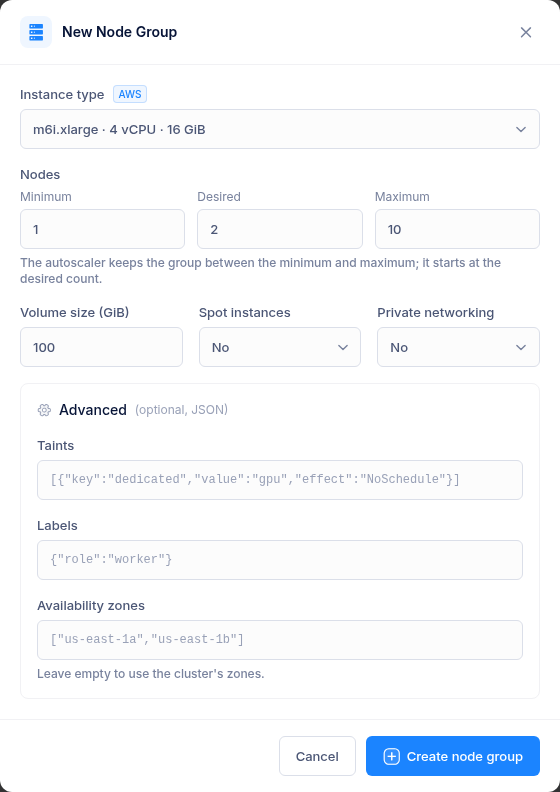
Click Create node group. It shows Creating for several minutes, then Running. Click the status badge to follow its progress.
Manage a node group
Use the ⋮ menu on the row:
| Action | Who | What it does |
|---|---|---|
| Scale | Write, Admin | Change the minimum, maximum and desired node counts. The group shows Scaling until the change is applied. |
| Edit alias | Write, Admin | Give the group a friendly name. The generated name, such as c-42-ng-7-v1-36, stays visible under the alias. |
| Sync | Write, Admin | Read the group's actual size and status back from the cloud, for example after someone changed it in the cloud console. |
| Logs | Write, Admin | Show the group's recent operation log. |
| Delete | Admin | Remove the group and its nodes. Pods on those nodes are rescheduled onto other groups, so make sure the remaining groups have room. |
Only one change runs on a cluster at a time. If another operation is in progress you see "This Cluster is Already being Modified". Try again when it has finished.
Fargate profiles
Clusters created earlier may also list Fargate profiles: serverless capacity for one namespace on AWS. They are shown for reference. New ones cannot be added from the console.