
Virtual services
A virtual service makes an application reachable from outside the cluster. It routes a domain and port on the cluster's load balancer to a Kubernetes service in one of your projects, and can issue and renew an HTTPS certificate for the domain.
You only set this up once per application. New deployments of the same service keep using it.
Before you start
You need:
- the service name and service port of your application. After a deployment, the CI/CD app details page lists the Kubernetes service it created.
- Admin access to the cluster's team, and room for another virtual service in the team owner's plan.
- for a custom domain with HTTPS: a DNS record that already points at the cluster. Create a CNAME from your domain to the Cluster load balancer address on the cluster's Overview tab, or an A record to one of its IP addresses.
Create a virtual service
Open the project and click New virtual service, then choose a type.
HTTP: a website or API
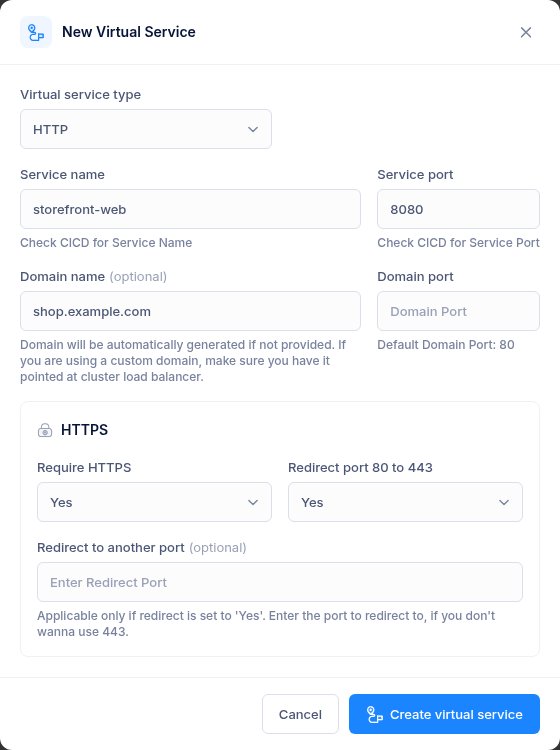
| Field | What to enter |
|---|---|
| Service name | The Kubernetes service, for example storefront-web. Lowercase letters, digits and hyphens. |
| Service port | The port the service listens on inside the cluster, for example 8080. |
| Domain name (optional) | Your own domain, such as shop.example.com. Leave it empty to get a generated one (below). |
| Domain port | The public port. Defaults to 80. |
| Require HTTPS | Yes issues a certificate for the domain and serves HTTPS. |
| Redirect port 80 to 443 | Yes sends plain-HTTP visitors to the HTTPS address. |
| Redirect to another port (optional) | Redirect to this port instead of 443. |
PORT: a raw TCP service
Use this for anything that is not HTTP, such as a database proxy, MQTT broker or game server.
| Field | What to enter |
|---|---|
| Protocol | TCP. UDP is not supported: the cluster's ingress forwards TCP only. |
| Service name / port | As for HTTP. |
| Domain name (optional) | As for HTTP. |
| Domain port | Required. The public port clients connect to, for example 1883. |
Click Create virtual service. The route is live within a minute or two. A new HTTPS certificate can take a few minutes more.
Generated domains
If you leave the domain empty, one is generated from the service name under the cluster's own domain. For example, service storefront-web on cluster 42 becomes:
storefront-web.c-42.k8s.kstych.com
A suffix of the form -<namespace>-service is dropped from the service name first. These names already point at the cluster, so HTTPS works straight away.
Manage virtual services
The project page lists each virtual service with its service and port, type, domain (a link you can open or copy), public port and HTTPS settings.
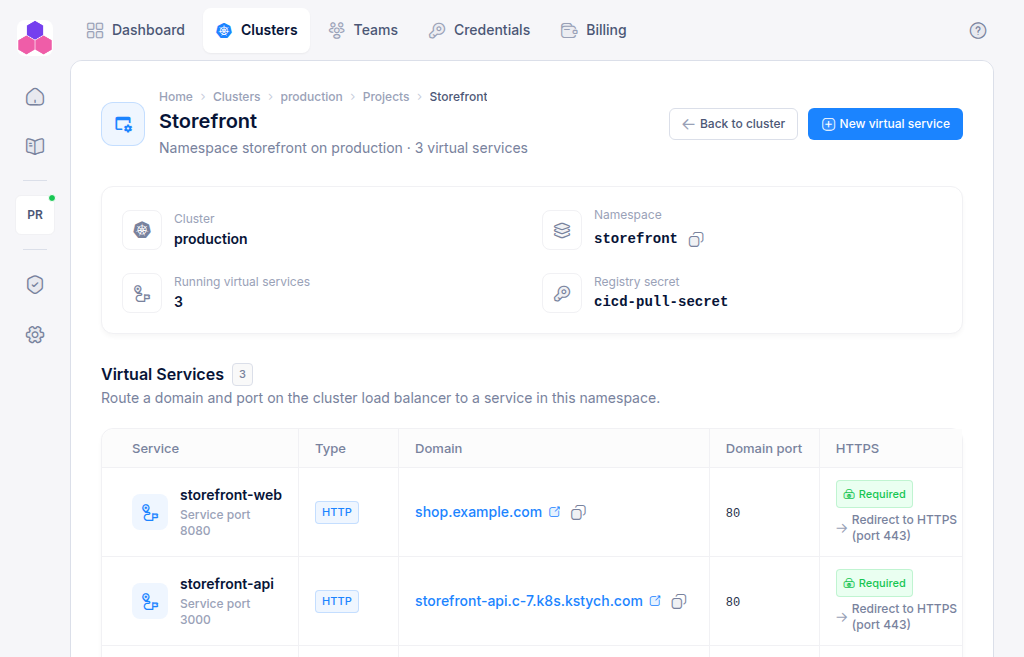 From the ⋮ menu:
- Open URL / Copy URL
- Delete: removes the route, its certificate and its redirect from the cluster. If the cluster cannot be reached, the virtual service is kept and you see the error, so you can retry.
Troubleshooting
| Message | What to do |
|---|---|
| DNS Check failed for Domain … | The custom domain does not point at the cluster yet. Add the CNAME or A record, wait for DNS to update, and try again. Or set Require HTTPS to No. |
| A virtual service with this name/port already exists | The same service, port, domain and domain port are already routed in this project. |
| Service Name must be a Kubernetes service name … | Use the exact service name: lowercase letters, digits and hyphens. |
| You have reached your Billing Plan limit … | Delete an unused virtual service or move to a larger plan. |