
Databases
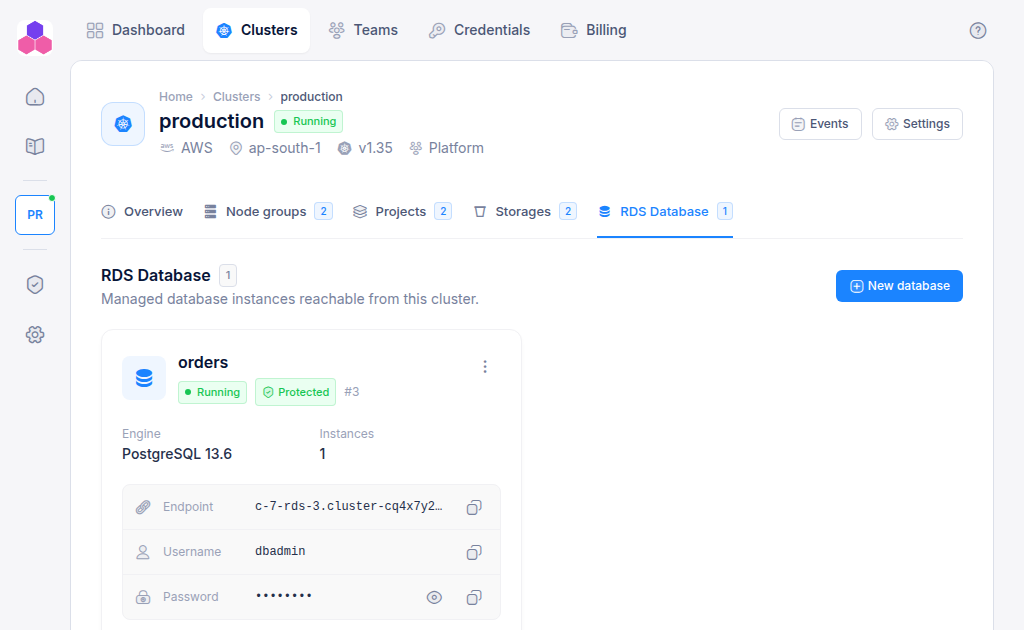
A managed database server is created in your cloud account, inside the cluster's network, so your applications on the cluster can reach it and the internet cannot. It is listed on the cluster's database tab (called RDS Database on AWS).
On AWS you get Amazon Aurora Serverless v2, which grows and shrinks with load between 0.5 and 128 capacity units. AWS bills you for the capacity used.
Create a database
- Open the cluster and select the database tab.
- Click New database.
- Choose the engine: PostgreSQL or MySQL.
- Enter a name to recognise it by, for example
orders. - Click Create database.
You need Admin access to the cluster's team. The database shows Creating for several minutes. Once it is Running, its card shows the engine and version, the number of instances, and the connection details.
Connect your application
Each database card shows:
| Field | Value |
|---|---|
| Endpoint | The host name to connect to |
| Username | dbadmin |
| Password | A generated password. Click the eye to reveal it and the copy button to copy it. |
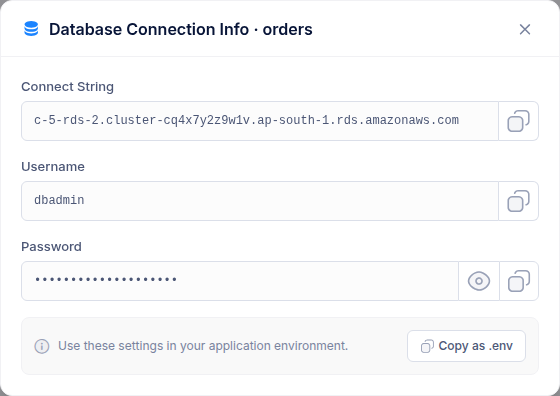
Choose Connection details from the card's ⋮ menu to see the same values in one dialog. Copy as .env copies them as:
DB_HOST=<endpoint>
DB_USERNAME=dbadmin
DB_PASSWORD=<password>
The server starts with one database named k8s_rds_<database ID>. Connect to it, or create your own databases on the server. The name you entered in the console is a label only.
Passwords are shown to team members with Write or Admin access. Read-only members see Write access required.
Store the password in your deployment as a secret, not in your code.
Protect and delete
From the card's ⋮ menu:
- Edit turns delete protection on or off. While it is on, the database cannot be deleted. Team Admins only.
- Delete removes the database server. Type the name to confirm. Team Admins only. On AWS a final snapshot named
c-<cluster ID>-rds-<database ID>-final-snapshotis kept in your account, so the data can still be restored from the RDS console. Delete the snapshot there when you no longer need it, because AWS bills for snapshot storage.
A cluster cannot be deleted while it still has databases. Delete them first.