
Teams and access
Every cluster belongs to a team, and what you can do with a cluster depends on your role in its team. A team's owner is the person who created it. The owner's billing plan pays for the team's clusters and sets its limits.
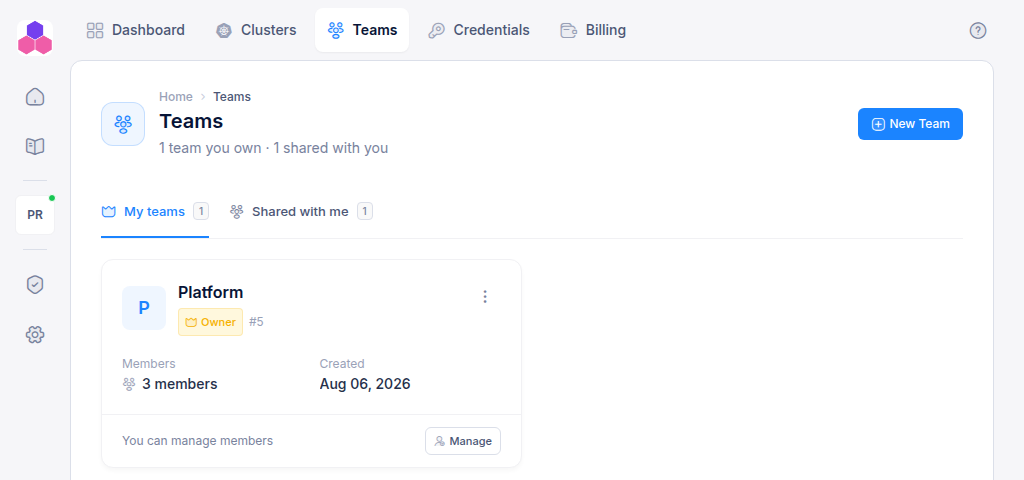
The Teams page has two tabs:
- My teams: teams you created and own.
- Shared with me: teams other people added you to, with the role they gave you.
Roles
| What you can do | Read | Write | Admin |
|---|---|---|---|
| See the team's clusters, node groups, projects, virtual services, storages and databases | ✓ | ✓ | ✓ |
| See passwords: platform services and databases | ✓ | ✓ | |
| Scale node groups, rename them (alias), sync them and read their logs | ✓ | ✓ | |
| Create clusters, node groups, projects, virtual services, storages and databases | ✓ | ||
| Edit, upgrade and delete clusters; delete node groups, virtual services, storages and databases | ✓ | ||
| Read cluster events and run cluster settings actions | ✓ | ||
| Add and remove members and change their roles | ✓ |
The owner is always an Admin of their own team, and only the owner can delete it.
Create a team
Click New Team, enter a name and click Create team. Your billing plan sets how many teams you can own.
Add people
- On the team card, click Manage. Team Admins only.
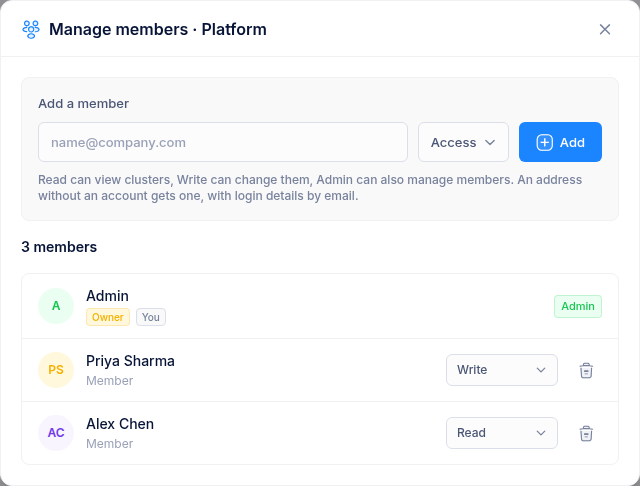
- Under Add a member, enter the person's email address and choose Read, Write or Admin.
- Click Add.
If the address has no account yet, one is created and the person receives an email with a temporary password. They should change it after signing in, from Profile → Security.
Change or remove access
In the Manage members dialog:
- Change a member's role with the drop-down next to their name. The change applies straight away.
- Click the bin icon to remove a member. They lose access to the team's clusters immediately.
You cannot change your own role or the owner's role, and the owner cannot be removed.
Delete a team
From the team card's ⋮ menu choose Delete team and type the name to confirm. Only the owner can delete a team, and only after all its clusters have been deleted.